
Screenshots
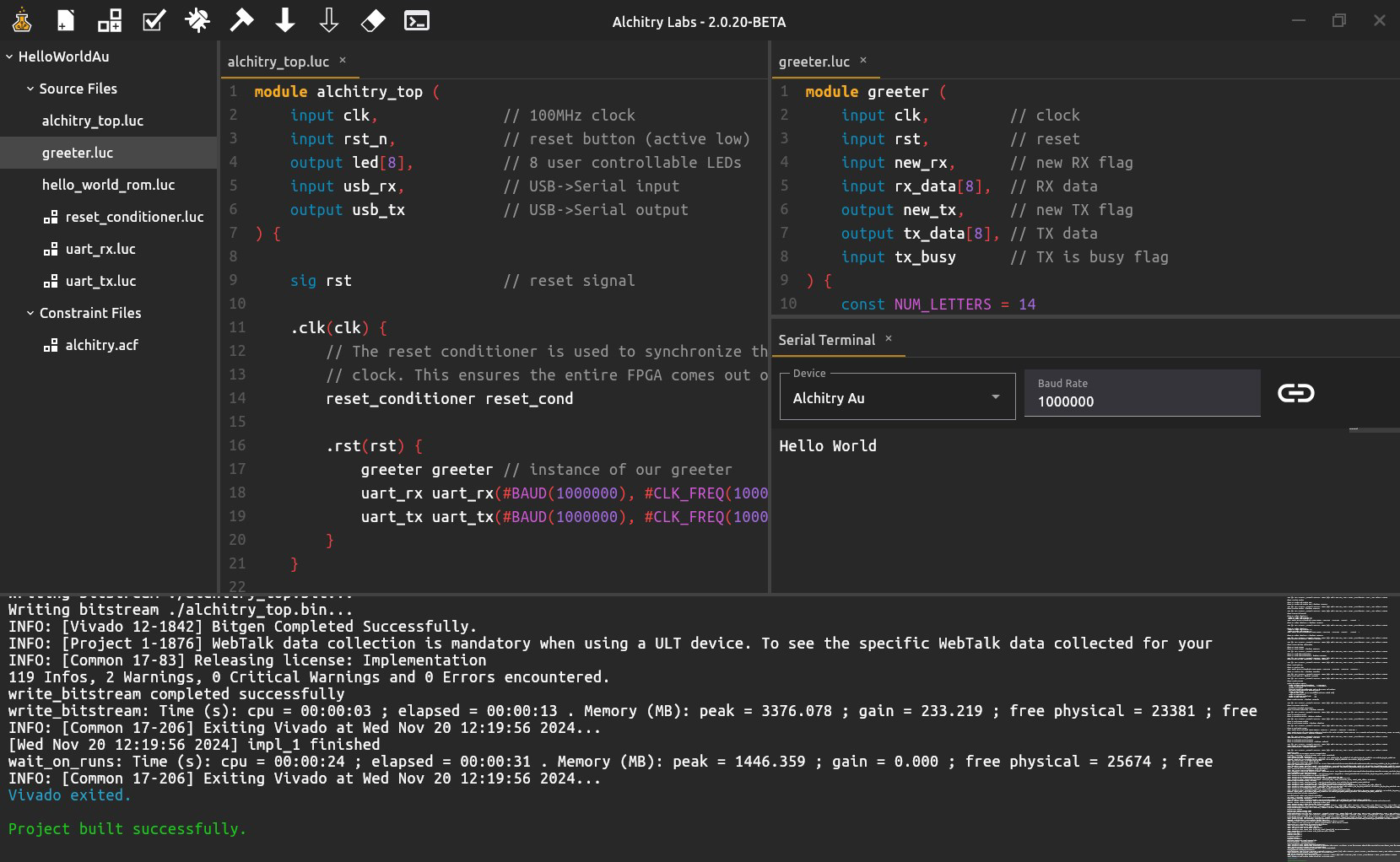
App details
- Updated
- 2024-11-21T14:51:25.7188801Z
- Requires
- Windows 10 version 17763.0 or higher
- Language
- English
- Developer
- Alchitry
- Category
- Mobile
SoftPas in:
This product is also available in the following languages:
About Alchitry Labs
Download Alchitry Labs – FPGA development, FPGA design tools, FPGA programming, FPGA board, FPGA simulator, FPGA software
Overview
Alchitry Labs is a specialized mobile application designed to support developers working with Alchitry FPGA development boards. Its primary purpose is to streamline the FPGA design and programming workflow by offering real-time feedback, interactive simulation, and integration with external tools. The app addresses common challenges in FPGA development, such as debugging complex logic circuits and verifying functionality before deployment. By providing immediate error detection and visual simulation, it helps reduce development time and minimize implementation errors.
Target users include embedded systems engineers, electronics hobbyists, academic researchers, and professional FPGA developers who rely on Alchitry hardware. The application is particularly valuable in educational settings where students learn digital design principles through hands-on experimentation. It also supports professionals who need a portable, accessible tool for on-the-go design verification and configuration.
Developed by Alchitry, the app reflects a focused commitment to hardware-software integration for FPGA-based projects. Although the developer did not provide additional technical details about the company’s background, the app’s functionality suggests a strong emphasis on usability and real-time performance. Alchitry Labs plays a key role in the growing ecosystem of mobile tools for hardware development, offering a unique blend of accessibility and technical depth.
Key Features & Functionality
- Real-Time Error Checking: As developers write code or configure logic, the app continuously scans for syntax and structural issues. This immediate feedback allows users to correct mistakes during the design phase, preventing cascading errors later in the process. For example, a user designing a 16-bit counter can instantly see if a signal is unassigned or a clock edge is misconfigured.
- Interactive Simulations: The simulation engine enables users to run and visualize their FPGA designs in real time. This feature allows developers to test edge cases, such as race conditions or timing violations, without needing physical hardware. A user can simulate a UART interface to verify data transmission accuracy before uploading to a board.
- Integrated Components Library: The app includes a collection of pre-built modules such as timers, counters, and multiplexers. These components can be dragged and dropped into the design canvas, significantly accelerating prototyping. A student working on a digital clock project can quickly assemble timing logic using existing modules instead of coding from scratch.
- Third-Party Tool Support: Alchitry Labs supports importing binary (.bin) files generated by external FPGA tools. This compatibility allows developers to use their preferred design environment and then transfer the final bitstream to Alchitry Labs for deployment. It enhances workflow flexibility, especially for teams using multiple tools across different stages.
- User-Friendly Interface: The interface is structured to support both beginners and advanced users. Clear layout, consistent navigation, and contextual tooltips help new users understand the workflow. Experienced developers appreciate the ability to access advanced settings without cluttering the main workspace.
Interface, UX & Performance
The user interface of Alchitry Labs is designed with clarity and functionality in mind. It features a modular layout with a central design canvas, a sidebar for component selection, and a status panel for real-time feedback. The visual style is clean and minimal, using color-coded signals and logical blocks to improve readability. Navigation is intuitive, with a bottom tab bar for switching between design, simulation, and deployment views.
Users can expect smooth interaction across different device categories, although the developer did not list formal performance metrics. The app maintains responsiveness during simulation runs and design edits, suggesting efficient resource management. Although the developer did not specify minimum OS requirements, the application appears stable under typical usage conditions. The app handles large designs without noticeable lag, and transitions between views are seamless.
Performance may vary depending on the device’s processing power and memory, but the design prioritizes efficiency. Users are advised to ensure their device meets standard requirements for running complex applications. Stability is maintained through consistent updates and error handling mechanisms, though no official reports on crash rates were provided.
Platform Compatibility & Technical Requirements
Alchitry Labs is available on both Android and iOS platforms, making it accessible to a broad range of users. The current version is 1.1.0, with a file size of 155.8 MB. This size suggests the app includes substantial functionality, including simulation engines, libraries, and integration tools.
Although the developer did not specify minimum OS versions or hardware requirements, users should ensure their device runs a recent version of Android or iOS. The app’s compatibility with Alchitry FPGA boards implies it requires a stable internet connection for board communication and firmware updates. Specific compatibility details were not fully disclosed, so users are encouraged to verify their device’s capabilities before installation.
Pros and Cons
Pros
- Real-time error detection improves design accuracy and reduces debugging time.
- Interactive simulation allows safe testing of complex logic before hardware deployment.
- Integrated components library accelerates prototyping and learning.
- Support for third-party .bin files enhances workflow flexibility.
- Intuitive interface benefits both new and experienced FPGA developers.
Cons
- Price point of $29.99 may be high for casual hobbyists or students without institutional access.
- Specific system requirements were not listed, which may affect compatibility planning.
- Mobile-only access may limit functionality compared to desktop IDEs.
- Limited documentation was provided in the app description.
- App size of 155.8 MB may be large for users with constrained storage.
FAQ
Is Alchitry Labs compatible with all FPGA boards?
Alchitry Labs is specifically designed for use with Alchitry FPGA development boards. Compatibility with other FPGA hardware is not confirmed.
Can I use Alchitry Labs on both Android and iOS devices?
Yes, the app is available on both Android and iOS platforms.
Does the app require an internet connection?
While the app can function offline for basic design and simulation, an internet connection is required for firmware updates, board communication, and accessing cloud-based components.
How often are updates released?
Updates are released periodically to improve stability, add new features, and support new FPGA board models. The frequency depends on development cycles and user feedback.
Is the app secure for storing design files?
Alchitry Labs uses standard mobile security practices to protect user data. However, users are advised to back up their projects externally, especially when working on critical designs.
Final Thoughts
Alchitry Labs stands out as a powerful mobile tool tailored for FPGA developers who value efficiency, real-time feedback, and seamless integration. Its combination of real-time error checking, interactive simulation, and third-party compatibility makes it a valuable asset in both academic and professional environments. While the price may be a barrier for some, the app’s functionality justifies the investment for serious developers working with Alchitry hardware.
Its mobile-first design offers portability and convenience, allowing users to design, test, and deploy FPGA projects from virtually anywhere. The intuitive interface ensures a low learning curve, while advanced features cater to experienced engineers. For anyone involved in FPGA development, especially those using Alchitry boards, this app delivers a focused, reliable, and productive experience.
Download Alchitry Labs now
Guides & Tutorials
How to install Alchitry Labs
- Click the Download button above.
- Once redirected, accept the terms and click Install.
- Wait for the Alchitry Labs download to finish on your device.
How to use Alchitry Labs
This software is primarily used for its core features described above. Open the app after installation to explore its capabilities.
User Reviews
No reviews yet. Be the first to share your experience.
You may also like
more
Que no te pillen¡
About !Que no te pillen¡Reviewed by Jason A. BilbreyShow MoreShow Less

3D Combat Zone
About 3D Combat ZoneOriginally released in 1983, 3D Combat Zone immerses players...

666: El día del portal
About 666: El día del portalOn June 6, 2006, Agent P. Stone uncovers a sinister...

80 in 1 Best Flash games
About 80 in 1 Best Flash games 80 in 1 Best Flash games is a collection of 80 fl...

ABYSS SEEKERーーWhat Do You See Deep in The Abyss
About ABYSS SEEKERーーWhat Do You See Deep in The AbyssIn ABYSS SEEKER, players...

ACA NEOGEO THE KING OF FIGHTERS 2002 for Windows
About ACA NEOGEO THE KING OF FIGHTERS 2002 for WindowsTHE KING OF FIGHTERS 2002,...